 Vaeroly
Help centre · For airline staff
Events, tours and focus airports
How to give your pilots something to fly together: events with bonus points, tours of several legs, and focus airports that pay extra for a while.
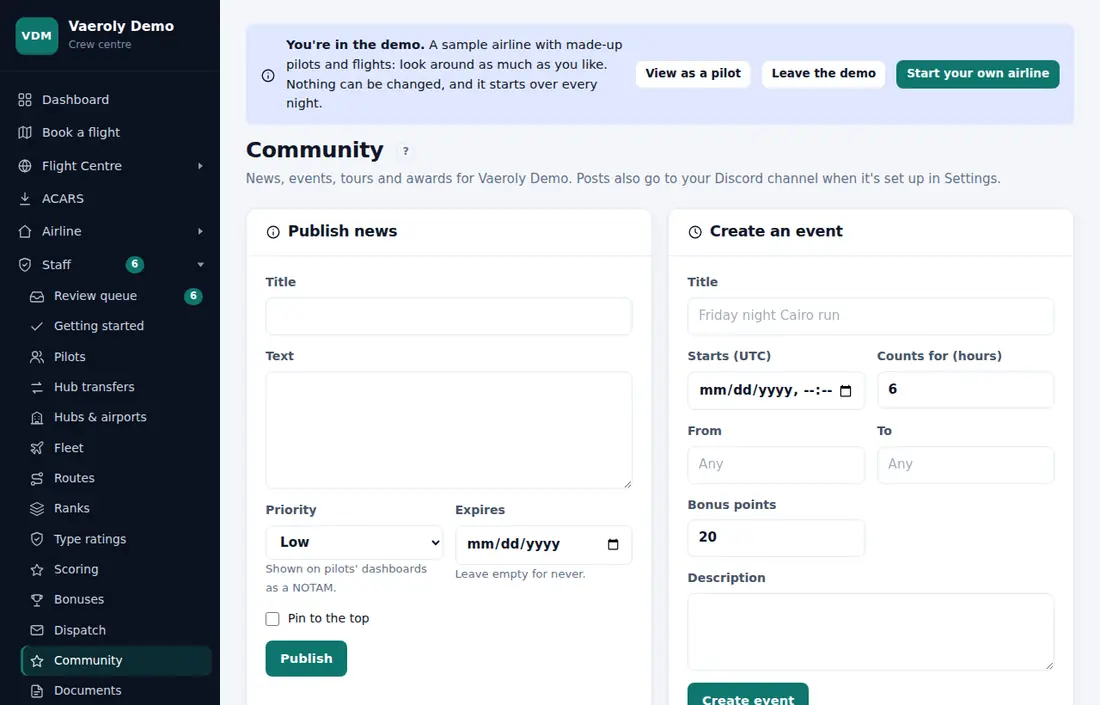
Create an event
Events are made on Staff → Community.
- Under Create an event, enter a Title.
- Set Starts (UTC) and Counts for (hours): how long after the start a flight still counts. This can be 1 to 72 hours.
- Optionally, enter a From and To airport. Leave either one empty to allow any airport.
- Set the Bonus points (up to 500) and add a Description.
- Click Create event.
If your airline has connected Discord, the new event is posted to your channel. Pilots reach events from the Events tile on their dashboard, and open one to sign up or use Add to calendar.
A PIREP gets the event's bonus when it's filed between the start time and the end of the window, and its airports match the event's. Pilots don't have to sign up to earn it.
The Events list on the Community page shows each event with its sign-ups. Use Edit to change it, or Delete to remove it. Deleting an event keeps the PIREPs flown for it, but they no longer point to the event.
Departure slots
If your airline has turned on Event departure slots, the event form also has Departure slots and Minutes apart. Each slot leaves that many minutes after the one before, starting at the event's start time. You can have up to 200 slots. Set 0 for no slots.
Each pilot takes one slot on the event's page, which also signs them up. They can then book the event flight for their slot time. If you lower the number of slots later, pilots holding the later slots lose them.
Events with other airlines
If your airline has turned on Events with other airlines, each event on Staff → Community has Invite to co-host. Type the other airline's ICAO code or web address. Their staff see the invitation on their own Community page, under Events with other airlines, and press Co-host it or Decline; they need the same switch on. Once accepted, the event shows at both airlines, pilots of both sign up and fly it, and each flight counts, with the event bonus, at the pilot's own airline. Either side can stop co-hosting.
Create a tour
Tours are also made on Staff → Community.
- Under Create a tour, enter a Name.
- Under Legs, list the flights. Write them as pairs, like
HECA-LGAV, LGAV-LIRF, one per line or separated by commas. Or write a chain of airports:HECA LGAV LIRF LEMD. - Leave Award for finishing it ticked to create an award for pilots who fly every leg, and pick an Emoji for it.
- Click Create tour.
Every airport must be in the airport list. If one is missing, add it on Hubs & airports first.
Pilots reach tours from the Tours tile on their dashboard. They see their progress and the airline's routes that fly each leg. Legs count only in order, and only with PIREPs that count (accepted or complete) filed after the tour was created.
In the Tours list, Hide takes a tour off the pilots' list, and Show brings it back. Delete removes it.
Surveys
If your airline has turned on Feedback surveys, open Staff → Surveys to ask pilots up to five questions: a rating from 1 to 5, one choice from a list (one choice per line), or free text. Ask all pilots, or only the pilots signed up for an event. Pilots find it under Airline → Surveys and answer once. Open a survey from the list to see the totals and each pilot's answers. Close stops new answers; deleting a survey deletes its answers too.
In Team challenges, you can also pick an Award for the winners: every pilot who flew for the winning team gets it when the challenge ends (not when it ends in a tie).
Focus airports
If your airline has turned on Focus airports, open Staff → Bonuses.
- Under Focus airports, enter the Airport, the First day and Last day, and the Bonus points.
- Add a Note if you like.
- Click Add focus airport.
Between those dates, a flight to or from that airport earns the bonus. If a flight touches more than one focus airport, it gets the biggest bonus. Pilots see current focus airports at the top of the flight list, and those routes are marked. Click Remove to end one early.
Points multipliers
If your airline has turned on Points multipliers, the Bonuses page also lets you multiply the points of some flights. You can choose:
- a route type, like cargo
- a route tag
- an aircraft type
- flights flown on VATSIM or IVAO
- flights to or from a focus airport
Pick what the flights are under Flights that are, enter a Value where it's needed, set Multiply by, and click Add multiplier.
All matching multipliers apply together, up to ×3 in total. They only multiply points a flight earned, so penalties never grow. The extra points show as their own line on the PIREP.
See Scoring groups and failure rules for the rest of how points are worked out.