 Vaeroly
Built with the community, for the community.
Run your virtual airline like a real one.
A crew centre, a flight recorder and an EFB that work as one, for MSFS, X-Plane and Prepar3D.
Want to see it first? Try the demo: a sample airline, as a pilot or as staff, no account needed.
VDM173 · A320OBBI → OERKFL370 452 KTCruise
Demo airline flightCruise Next: Descent
- Five simulators
- Windows, Mac and Linux
- iPhone, iPad and Android
- English, Arabic, German, French, Finnish and Italian
- Every feature, free for early airlines
In the air right now
Loading flights…
Nobody is flying right now.Flights in the last 7 days: 11
Flights at the airlines listed in our directory. No pilot names, and pilots who hide from live maps aren't shown.
Airlines flying with Vaeroly
Virtual airlines that run their crew centre here, and how much they have flown.
- 23Flights
- 44Hours flown
- 6Active airlines
- 12Active pilots
- 10Countries flown to

Join, book, fly. No waiting.
- Pilots
- 16
- Flights
- 8
- Hours flown
- 14

"Inspired by Nature. Driven by Flight."
- Pilots
- 4
- Flights
- 7
- Hours flown
- 13
Elevate Beyond. ✈️ Welcome to Veltrix Airways, where innovation, precision, and passion take flight. More than just a virtual airline, Veltrix delivers a
- Pilots
- 3
- Flights
- 1
- Hours flown
- 1
- Pilots
- 1
- Flights
- 1
- Hours flown
- 2
One flight, start to finish
Every step happens in Vaeroly, so nothing is typed twice.
- 1 Book
Pick a flight
From your airline's schedule. The aircraft, callsign and SimBrief plan come with it.
Try the demo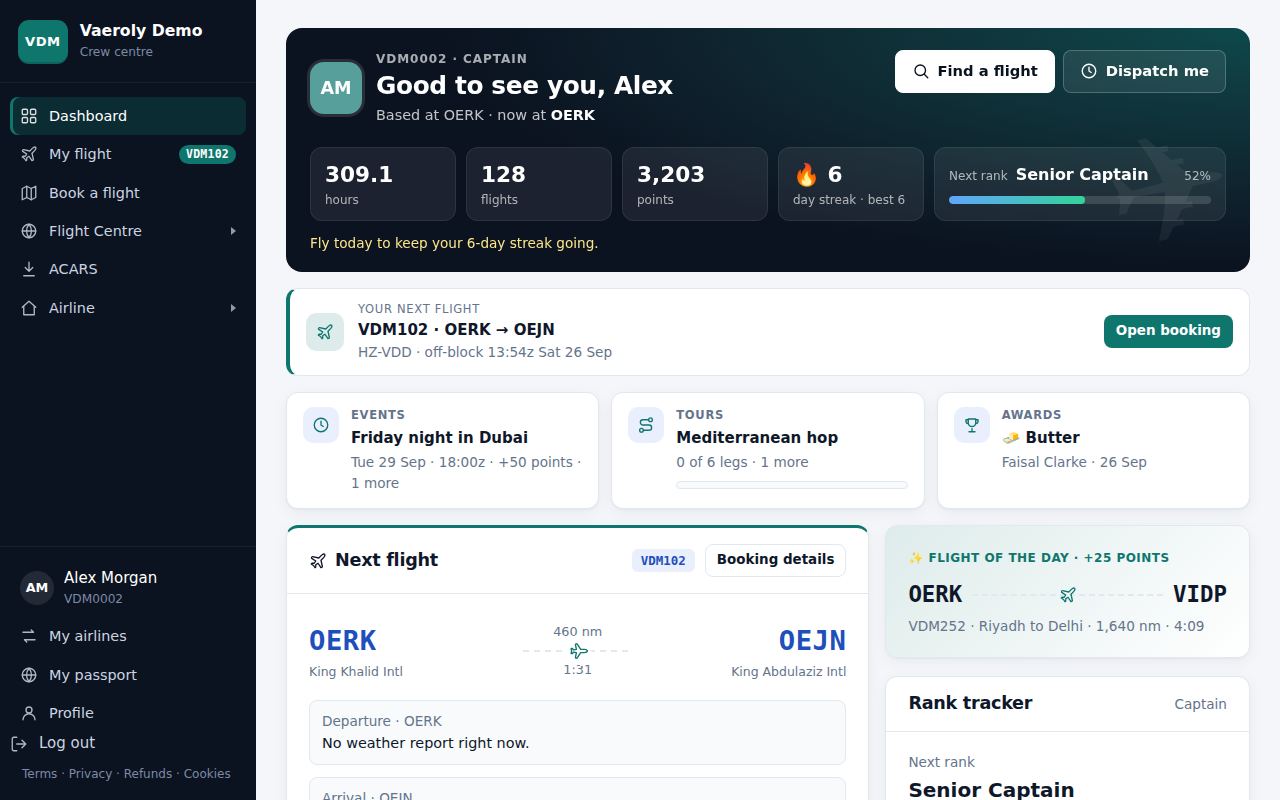
- 2 Brief
Open the EFB
The plan, weather, NOTAMs, loadsheet and checklists, on your phone or inside the simulator.
See the EFB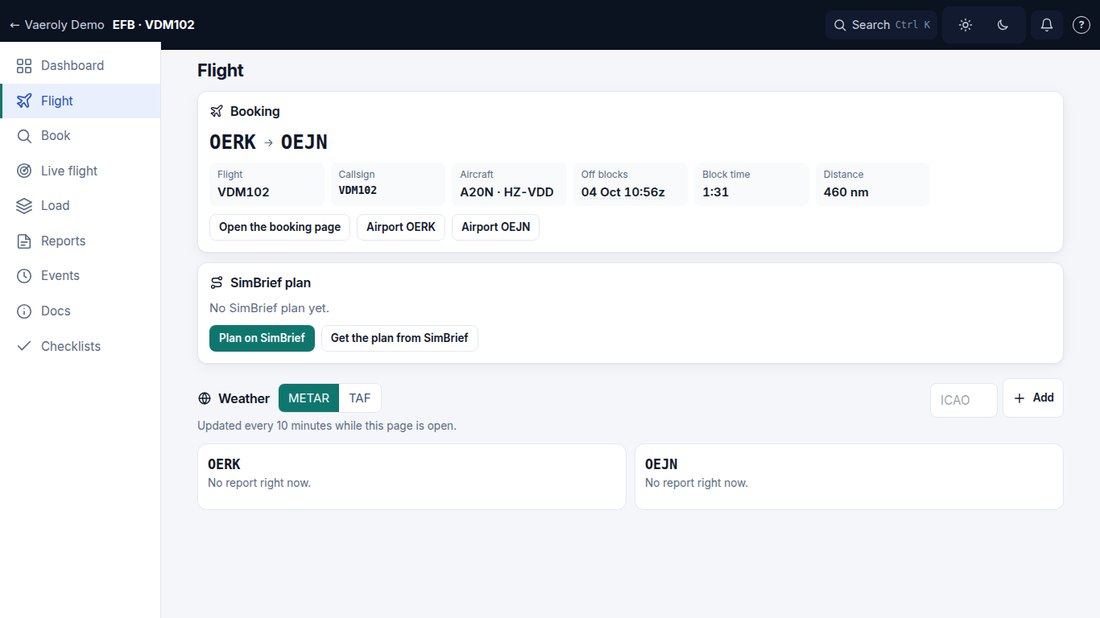
- 3 Fly
The app records it
Phases, landing rate, approach checks and the whole track, straight from the simulator.
See the Vaeroly app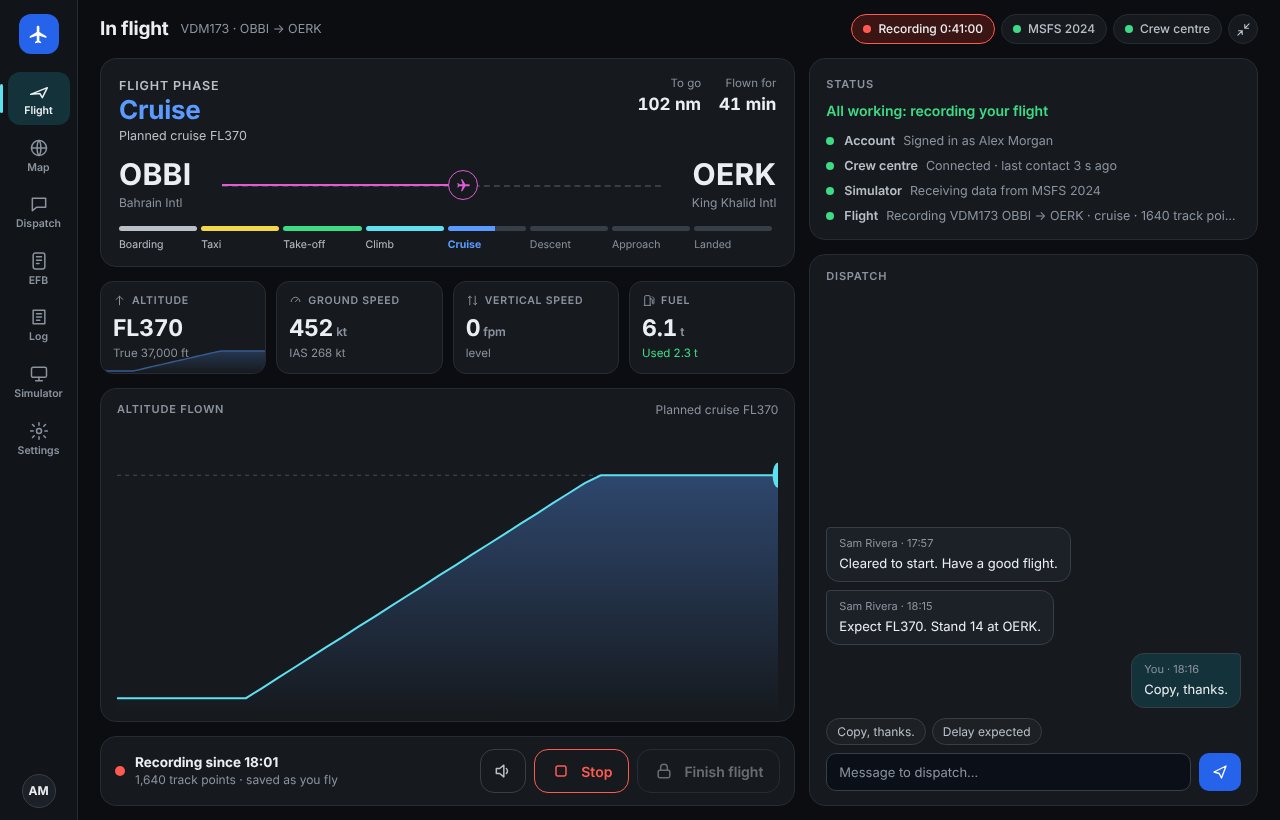
- 4 Debrief
Your PIREP, scored
Filed when you park, with the landing analysis and points, then reviewed by your staff.
Try the demo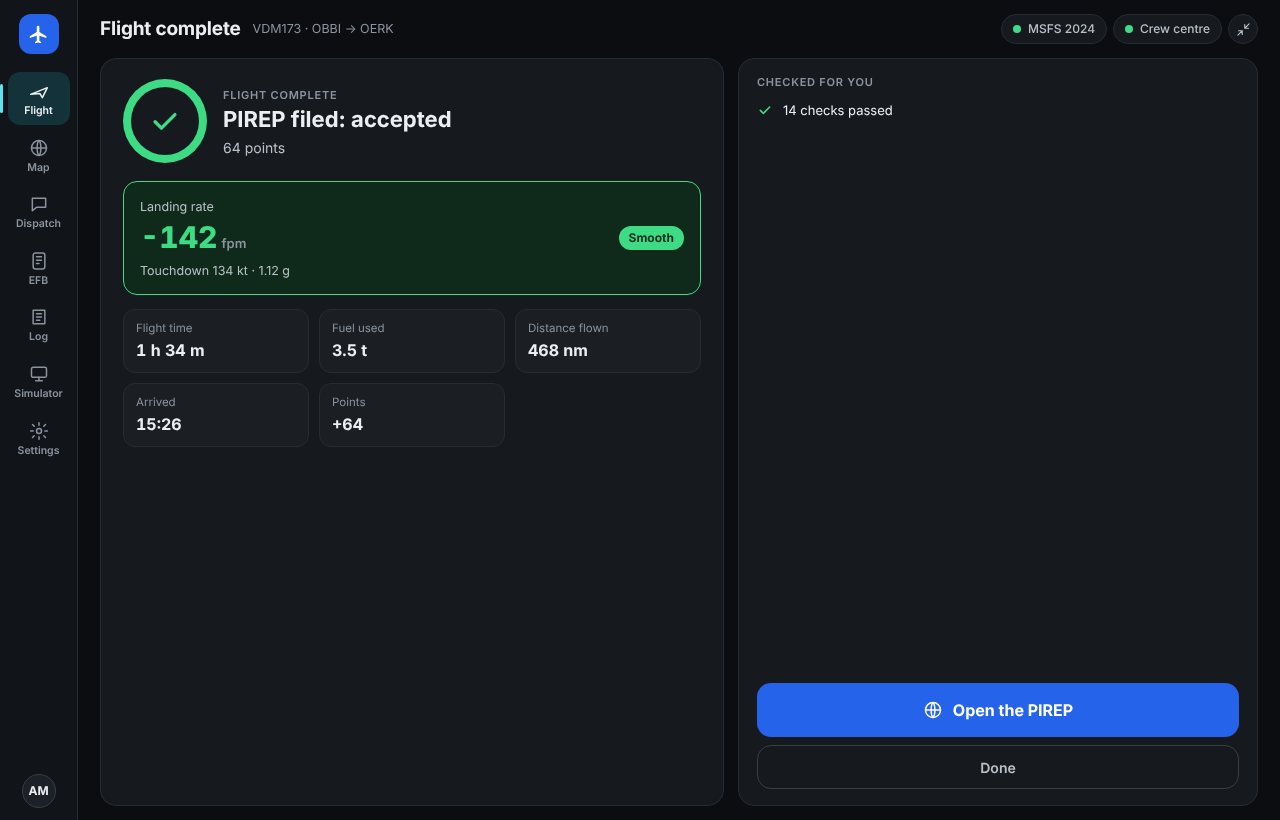
Every flight recorded, straight from the simulator
One app for every airline you fly for. It finds your booked flight, records it from the simulator and files the PIREP when you park.
- Landing analysisFlight phases, landing rate, approach checks and the whole track, even if your connection drops.
- Dispatch in the cockpitMessages from dispatch right in the app, and a Vaeroly panel in the MSFS toolbar so you can stay in the cockpit.
- What changed for youAfter each update, the changes for your simulator and aircraft come first, so you know what's different before your next flight.
- Sign in onceSign in once with your browser, or scan a code from the website with your phone: no password to type. Your next booking loads by itself, and the app keeps itself up to date.


Your EFB, wherever you fly
The flight, the SimBrief plan, weather, NOTAMs, the loadsheet, runways, checklists and dispatch messages in one place. Tick a checklist item in one place and it's ticked in the others.
In the Vaeroly app
Press EFB: it opens for your booked flight.
Inside the simulator
The Vaeroly panel in the MSFS toolbar.
On your phone or tablet
iPhone, iPad, Android or any browser.


Run it like a real operation
Everything your staff need in one place, and nothing for you to host.
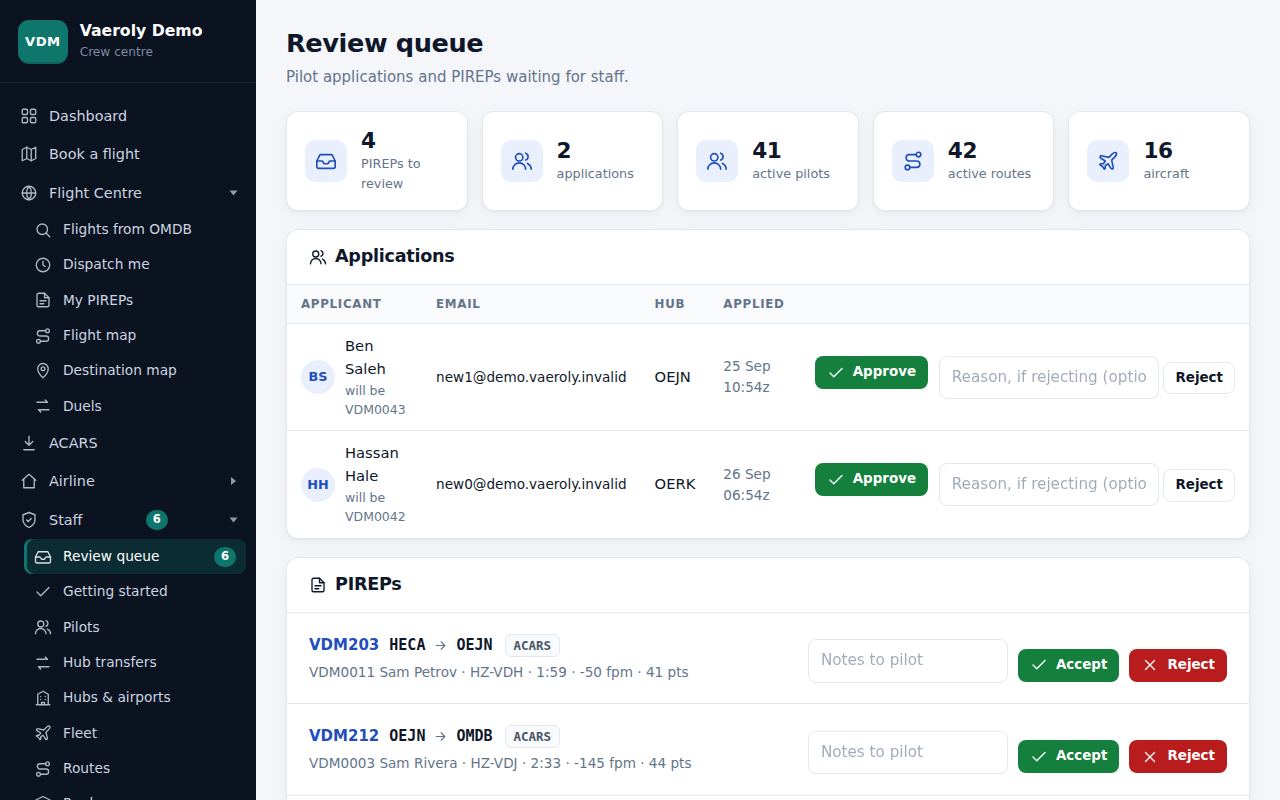
- Staff toolsReview queue, staff roles, PIREP comments, hub transfers, documents and an audit log.
- Staff step in when a flight goes wrongCancel a pilot's booking with a reason they see, file a PIREP for a flight ACARS lost, and decide PIREPs, applications and transfers from the EFB's Staff tab, on a phone too.
- Move your airline hereA guided move in five steps: fleet, routes and airports, pilots and their hours, flight history, then the invitation.
- Company routesSave your standard routing on each route: dispatch fills it in and sends it to SimBrief.
- Ranks & scoringRanks by hours, points or flights, with your own scoring rules.
- Discord botPilots link in your server; nicknames become their pilot ID; flights and news posted for you.
More tools for staff
- Fly from anywhere to anywhereLet pilots fly charters between any two airports, off your routes and hubs: a light aircraft flight, for example.
- Charter tripsPilots plan a charter of several legs from anywhere to anywhere; each leg is booked for them when they file the leg before it.
- ATC online at your airportsPilots see the VATSIM and IVAO controllers online at each flight's departure and arrival, and can list only flights with ATC.
- VATSIM rating on applicationsApplicants can show you their VATSIM pilot rating and hours, only if they choose to.
- Landing coachPilots see their landings as a trend, by aircraft type, with one tip to work on.
- VATSIM group flightsThe event page shows who is connected on VATSIM, and an event's bonus can go only to flights seen there.
- VATSIM events in one clickSee the VATSIM events at your hubs and routes, and add one as an airline event with its name, time and airports filled in.
- Pilot inbox and notificationsSend a message to one pilot, a hub, a rank or everyone, and pilots reply in private. Pilots without the phone app get a notification in their browser too.
- Mentor programmePair each new pilot with an experienced mentor who notes their first flights and signs them off. Pilots who fly for real can ask staff to verify it and get a badge.
- VATSIM track on claimsWith the pilot's tick, a flight claim shows staff where VATSIM saw them, next to the screenshots.
- Public route listShow your fleet and scheduled routes on a public page that search engines find. Off until you turn it on.
- Our crew hereEach airport shows your crew's usual runway, average landing, go-arounds and tips you approve.
Fly your airline's schedule on VATSIM and IVAO
Vaeroly is a crew centre, not a network: pilots connect to VATSIM or IVAO with the networks' own software, as always. We help them do it properly:
- Correct ICAO callsigns and flight plans, prefiled from SimBrief to VATSIM and IVAO in one click.
- A check that the callsign is free before you connect.
- Flights confirmed as flown online from the networks' public data, so airlines can reward online flying.
- The VATSIM CID is filled in and confirmed when a pilot signs in with VATSIM; IVAO IDs stay on the profile. We never connect to a network for them.
Airlines on VATSIM Airlines on IVAO
Vaeroly is independent and not affiliated with or endorsed by VATSIM or IVAO. Pilots flying online follow each network's Code of Conduct and rules. See our Privacy Policy for the network data we use.
Everything a virtual airline needs
Built for pilots who fly seriously and staff who run it like a business.
Watch any flight again at 1×, 10× or 60×, with marks for the take-off, each touchdown and the approach checks.
Go Nothing to watch for on this flight.
- DepartureGo
- ArrivalGo
- IcingGo
- CurfewGo
Caution Strong gusts at the arrival, close to your aircraft's crosswind limit.
- DepartureGo
- ArrivalCaution
- IcingGo
- CurfewGo
No-go The arrival airport is closed at night when you would land.
- DepartureGo
- ArrivalGo
- IcingGo
- CurfewNo-go
Go, Caution or No-go on every booking, with the reason: the weather at both ends, icing, SIGMETs on the route, NOTAMs, curfews and the alternate. Advice only.
Before you leave, the booking page compares the arrival's crosswind, now and forecast, with your aircraft type's limit, and lists alternates when it's over.
Every flight at every airline you fly for, and the ones you bring from another tracker, in one private logbook you can search, with each landing graded.
- 0142
- 0235
- 0328
- 0419
- 0511
Events and tours run for many airlines at once, with every pilot's flights on one leaderboard.
Show all features
Why a crew centre, and why this one
Most virtual airlines start with a spreadsheet and a Discord server, or run their own website. Here's what changes.
| Feature | Vaeroly | Spreadsheet and Discord | Your own website and server |
|---|---|---|---|
| Flights recorded automatically | Live ACARS, landing analysis, scoring | Pilots type them in | Depends on the add-ons you install |
| Schedule, bookings, SimBrief | Built in | By hand | Varies |
| Staff tools | Review queue, roles by permission, activity log | Messages and good will | Varies |
| Hosting, updates, backups, security | Done for you, encrypted nightly backups | Nothing to host | Your job, on your server |
| Getting started | Minutes; import your routes and pilots | Minutes | Days of setup |
| Your data | Export everything any time | Yours | Yours |
| Cost | Free for early airlines | Free | Hosting, plus your time |
Your next departure.
Every feature included, unlimited pilots and flights.